Starlink’s free month is now $100. Here’s how to see it on your order.
Starlink opened in a new tab. Look for this green “Referral Code Applied” box under Checkout:
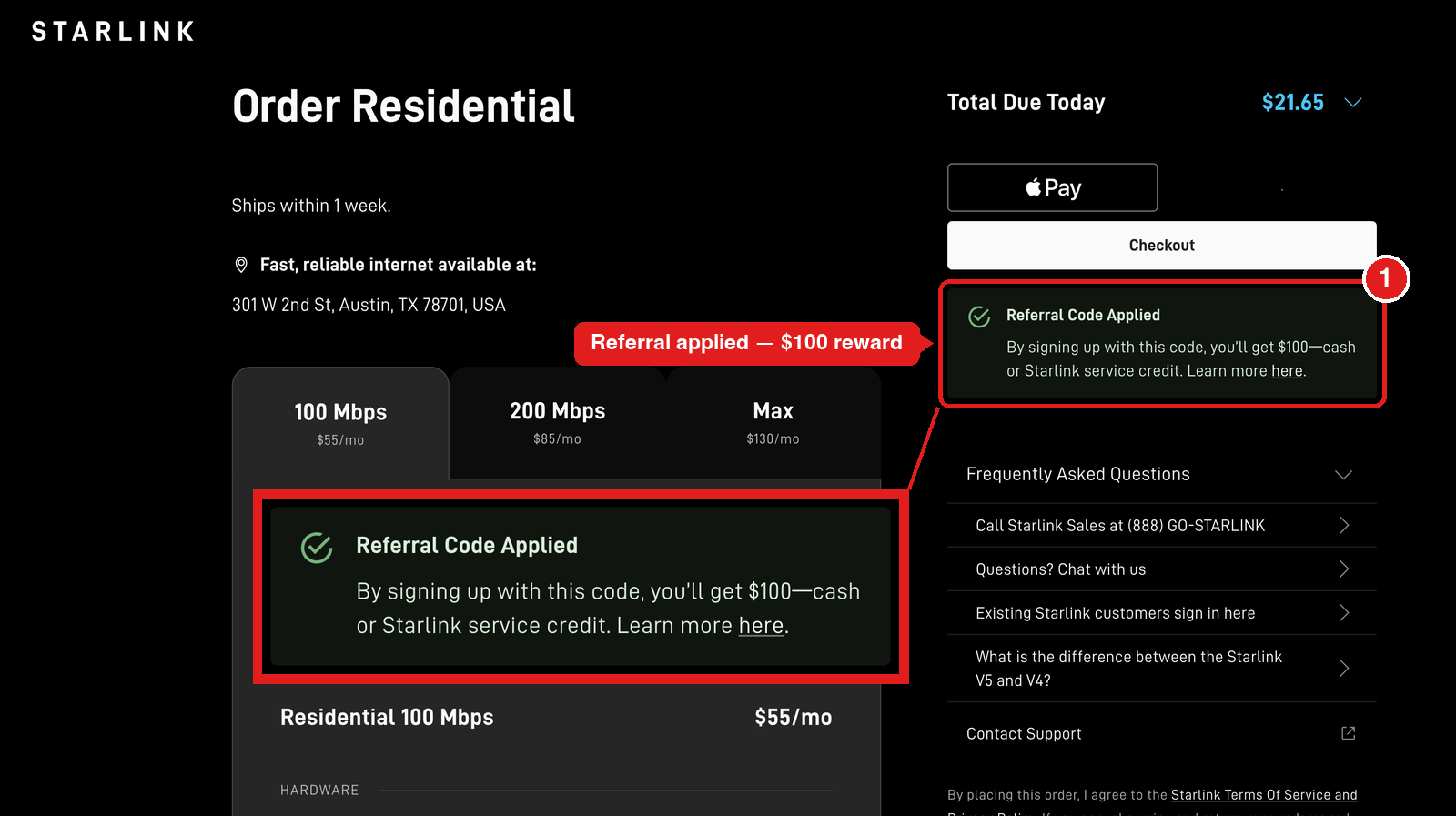
- Link openedstarlink.com is in your other tab
- Find the green boxunder Checkout, on the order page
- $100 on bill 2after two billing cycles
Came here for the free month? It changed in October 2026
Same link, same wait, different prize. Starlink rewrote its US referral terms on Oct 7, 2026, and the free month went away. In its place: $100 for the new customer, the same amount the person who shared the link gets.
Until Oct 2026
1 free month
One month of service free, taken off your second monthly bill.
Now
$100 reward
Account credit by default, or cash where your account offers it. Applied on your second monthly invoice.
How we took the screenshot above
We ran an order through this site’s referral link on , for Residential 100 Mbps at a public test address, Austin City Hall, 301 W 2nd St, Austin, TX. We stopped before paying. This is what Starlink showed. Prices have since moved to address-based: starlink.com shows no Residential price until you enter a service address, and Residential 100 Mbps now runs $44–$55/mo, depending on your address.
Starlink’s home page won’t mention the referral. The proof only shows up on the order page, right under the Checkout button. If the box isn’t there, see the fixes below before you pay.
From the home page to the green box, in four moves
Start on the starlink.com tab that just opened
Leave this page open and switch tabs. The referral rides in that tab’s web address, so work from there and don’t type starlink.com into a fresh tab.
Put in your US service address and pick a plan
Starlink checks it can serve the address, then lists the plans. Choose the one you want, for example Residential 100 Mbps.
Land on the order page and find the Checkout button
This is the page with your plan, the kit and the order summary on it. You don’t need to pay to see the referral check.
Look just under Checkout for a green box
It is headed “Referral Code Applied” and says you’ll get $100, as cash or Starlink service credit. If it’s there, the referral is on your order.
What the box says, word for word (read )
Referral Code Applied
By signing up with this code, you’ll get $100—cash or Starlink service credit. Learn more here.
When the $100 lands: a page from the calendar
The free month used to show up on bill 2. The $100 keeps the same rhythm. Starlink's referral terms say the reward is applied on your second monthly invoice.
- Today
Order day
Green box under Checkout Check, then payKit, shipping and tax are charged as normal. The reward isn’t a discount at checkout.
- Month 1
Bill 1
Your Payment Due Date Full priceThe day you activate, or 7 days after delivery if that’s sooner. Paying it all is expected.
- Month 2
Bill 2
Same day, one month on $100 applied hereWhere the old free month used to be. Look in the bill preview and your account’s Referrals section.
- After month 2
Still nothing?
Two full cycles done Time to askOnce two billing cycles are complete, run the troubleshooter before contacting Starlink.
Don’t see the green box?
Fix it before you pay. Once the order is placed, Starlink can’t add a referral that wasn’t on it.
- Reopen the link in this same browser. Use the button at the top of this page, then go back through address and plan. The box should appear on the order page.
- Stay on one device and one app. A link opened on your phone won’t follow you to a laptop, and whether a referral link opened in a browser carries over if you finish the order in the Starlink appunverified. Finish where you opened it.
- Private windows and cookie blockers. A private window that gets closed midway, or a browser that blocks starlink.com’s cookies, can drop the referral. Use a normal window and allow the site.
- Typing starlink.com by hand loses it. So does a search result or a bookmark. Only the link itself carries the referral.
- Had Starlink before? Then the box may never show: existing or returning customers are not eligible. What returning customers can do
- Bought the kit in a store? kits from resellers, retailers or an account transfer are not eligible, so there’s no referral to apply. Your options
The reward rules on one card
- For new customers only: you are not, and have never been, a Starlink subscriber.
- Order on starlink.com through the link: the order must be placed with a customer's unique referral link; no other referral method counts.
- Stay put: two full monthly billing cycles on a high-speed plan, continuously, with Standby Mode not counting.
- How it’s paid: it arrives as a service credit by default; where your account offers it, you can switch it to cash in the Referrals section.
- It can change: the terms and rewards can change on 30 days' notice, and the reward amount that applies to you is the one shown in your Starlink account.
“Upon activation, the Referred Subscriber will receive the same Reward, applied on their second monthly subscription invoice.”
Quick questions from free-month readers
Is this the same thing as the free month?
Do I have to type a referral code anywhere?
I closed the Starlink tab. Did I lose it?
Why isn’t the $100 on my first bill?
Does the green box guarantee the reward?
Sources
- Does Starlink have a referral program? (Starlink help center) Starlink
- Starlink referral program, Aug 25, 2026 (satelliteinternet.com) Press
- Referral Program Terms, US (starlink.com legal document DOC-1882-84808-83) Starlink
- Starlink Terms of Service, US (sections 3, 6.2 and 6.3) Starlink
- What are the Residential plans? (Starlink help center) Starlink
- Starlink home page, US (starlink.com) Starlink
Where to next
- When the $100 reward shows upYou pay bill 1 as normal. The reward comes from bill 2 on, by the two-month mark. Put in a date to see yours.
- $100 reward not showing up?Answer up to five questions to find which check failed and what to do.
- How to get the $100 referral reward, step by stepSeven short steps from opening the link to seeing the reward in your account.
- Who qualifies for the $100 referral rewardThe rules from Starlink’s terms, the edge cases, and a decision tree.