Key takeaways
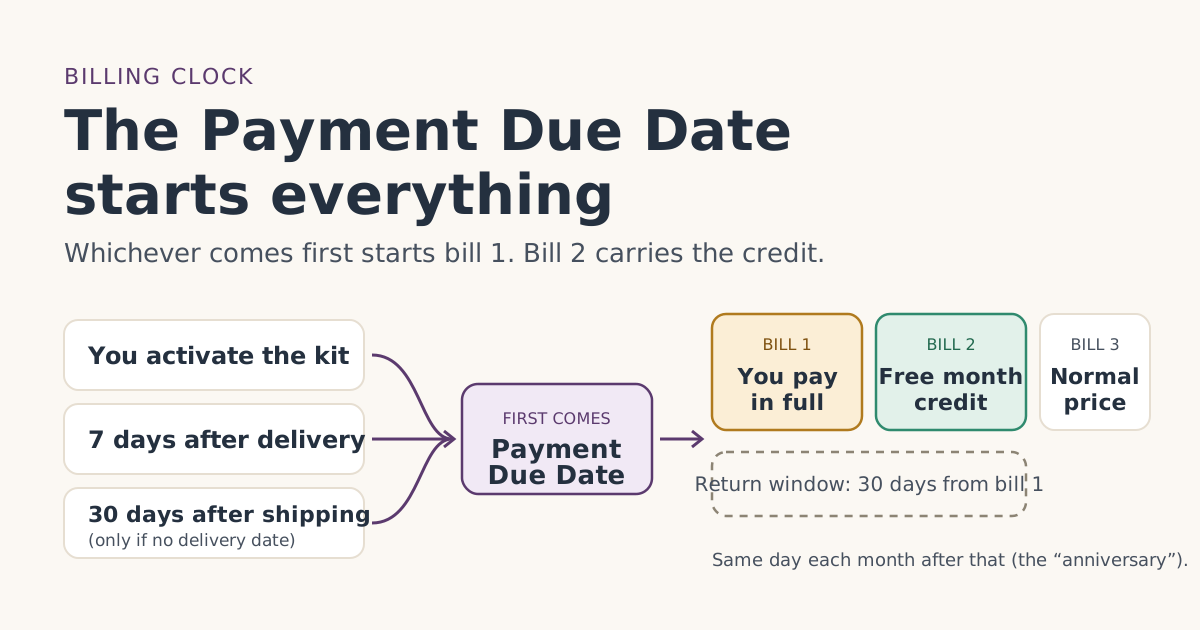
- Your Payment Due Date is the day of your first charge. Starlink sets it as your first charge comes on the earliest of: the day you activate, 7 days after delivery, or 30 days after shipping if there's no delivery date (the 'Payment Due Date').
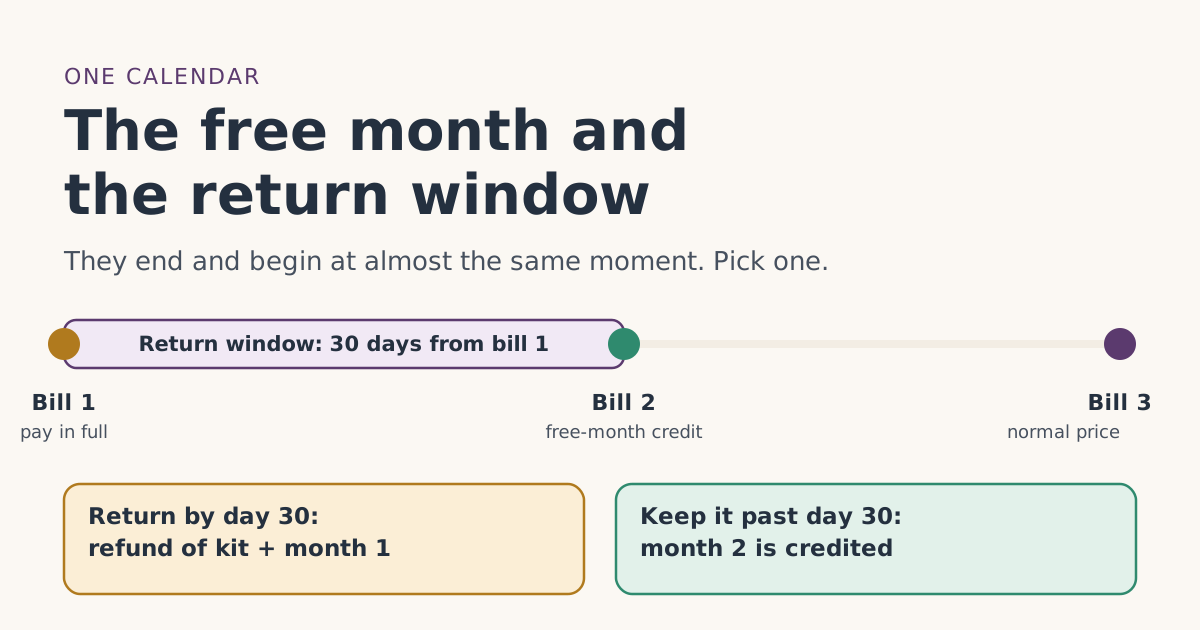
- Bill 1 is charged in full on that day. The free month is applied as a credit to your second monthly bill; you pay the first month.
- The 30-day return window counts from the same day, so it closes right around the day bill 2 is generated.
- Not setting the kit up does not pause the clock. Billing starts 7 days after delivery either way.
- Find the exact date in your account under Billing. Starlink says billing date changes or delays are not supported.
Your Payment Due Date is the day Starlink first charges you for service. Starlink sets it as your first charge comes on the earliest of: the day you activate, 7 days after delivery, or 30 days after shipping if there's no delivery date (the 'Payment Due Date'). Every other date that matters for the free month counts from that one day: bill 1 is charged on it, the 30-day return window starts on it, and the free-month credit lands on the bill that comes one month later.
If you know your Payment Due Date, you can predict your whole first three months. If you guess it wrong, you can end up cancelling a day late, panicking about a full-price first bill, or missing the return window. This guide shows how the date is chosen, where to find it, and what it means for each bill, with worked examples.
How Starlink picks your Payment Due Date
The rule comes from section 3 of Starlink’s US Terms of Service. Three events can start billing, and whichever happens first wins:
- You activate the kit. Setting it up in the app or at starlink.com/activate starts billing that day.
- Seven days pass after delivery. If you haven’t set it up a week after the carrier marks it delivered, billing starts anyway. Starlink’s billing help article says the kit is activated automatically at that point.
- Thirty days pass after shipping, if there is no delivery date. This is the fallback when tracking never shows a delivery.
After that, later bills come on the same day each month (the anniversary of the Payment Due Date). Starlink’s help center gives its own example: activate on June 28 and your cycle runs June 28 to July 27, with the next bill on July 28.
What does not start billing
- Placing the order. When you buy on starlink.com you pay for the kit at checkout, but Starlink says your first month of service is not part of that charge.
- Shipping, unless tracking never shows a delivery date (then the 30-day fallback applies).
- Opening the box. Unboxing is not activation.
Why the free month is not on bill 1
People often expect the free month to make their first bill zero. It doesn’t. Starlink’s own help article on referral links lays the months out plainly: you pay for the first month, and in the second month a service credit is deducted from your next invoice. The referral terms say the same thing in legal wording: the free month is “applied to their second monthly subscription invoice.”
Starlink’s billing FAQ adds why: referral credits are applied about 30 days after the new customer activates, which puts them on the second bill rather than the first. Activation is part of how Starlink confirms the referral is real.
So the free month is applied as a credit to your second monthly bill; you pay the first month. Bill 1 at full price is normal. It does not mean anything went wrong.
Worked examples with real dates
These use the rules above. The plan price is Residential 100 Mbps at $55/mo (select areas only), as an example. Your plan and price may differ.
| Situation | Payment Due Date (bill 1) | Return window closes | Bill 2 (free-month credit) | Bill 3 |
|---|---|---|---|---|
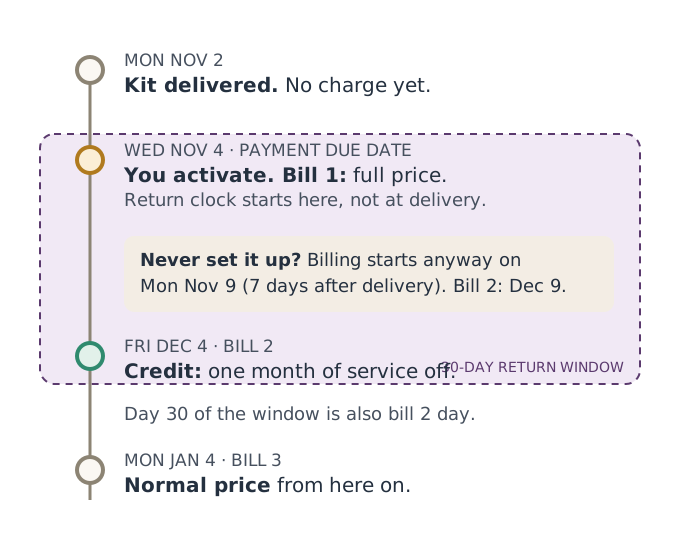
| Delivered Mon Nov 2, set up Wed Nov 4 | Wed Nov 4 | Fri Dec 4 | Fri Dec 4 | Mon Jan 4 |
| Delivered Mon Nov 2, never set up | Mon Nov 9 (day 7) | Wed Dec 9 | Wed Dec 9 | Sat Jan 9 |
| Set up on Sat Jan 30 | Sat Jan 30 | Mon Mar 1 | Sun Feb 28 (moved to the 28th) | Sun Mar 28 |
Example 1 in money terms. On Nov 4 you pay one month of service at the plan price. On Dec 4 bill 2 is generated, and the credit takes one month of service off it, so the service charge on that bill should come out to zero if nothing else changed. On Jan 4 you pay the plan price again. Over three months you pay for two months of service, not three.
Why the third row looks odd. Starlink’s billing article says that if you activate on the 29th, 30th or 31st, your billing date adjusts to the 28th. It does not explain how the first, shorter cycle is charged, and how the credit lines up with a prorated or plan-changed billunverified is not described anywhere we can find. If you activate late in a month, check your bill preview rather than assuming.
The return window is "within 30 days of the Payment Due Date" and bill 2 falls on the monthly anniversary of it. After a 30-day month those are the same day. After a 31-day month the window closes a day before bill 2, and around February it can close a day or two after. Either way, the window shuts right around the time the credit would arrive, so plan on one or the other: return the kit inside the window, or keep it and collect the free month on bill 2.
How to find your Payment Due Date
You don’t have to calculate it. Once billing has started, Starlink shows it in your account.
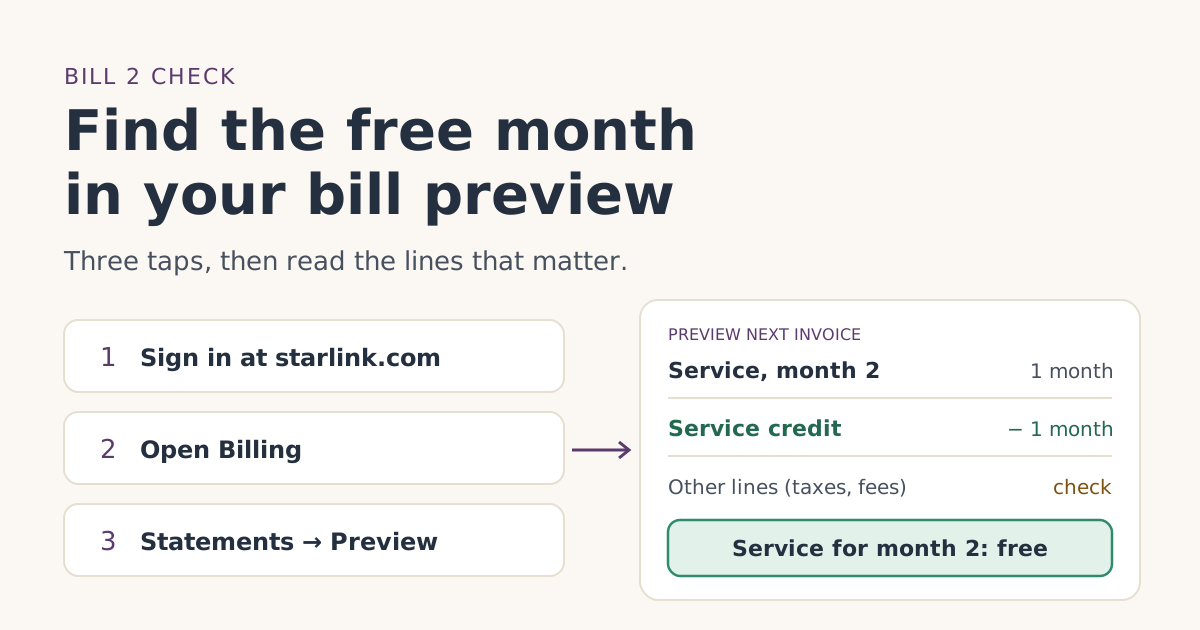
- Sign in at starlink.com (type the address yourself rather than following an email link).
- Open Billing. Starlink’s billing article says your billing cycle and Payment Due Date are shown on the Billing tab.
- Look at the first statement. Its service period starts on your Payment Due Date.
- Preview the next invoice. Starlink says the preview updates each day and reflects charges due as of that day. Once the referral is confirmed, Starlink emails you when the free month is confirmed, and the bill preview in your account shows month two as free.
Also watch your email. Starlink says it sends a “Payment Scheduled” email the day your monthly payment is taken. Your first one marks your Payment Due Date.
Before billing starts, you can work it out yourself: take your delivery date and add 7 days. If you plan to set the kit up sooner, that day becomes the date instead. Our date tool on the billing timeline page does this for you, and our guide to checking the bill preview shows where to confirm it once billing starts.
What the date controls, bill by bill
| Bill | When | What you pay | What to check |
|---|---|---|---|
| Bill 1 | Payment Due Date | Full month of service | The plan name is the one you picked |
| Bill 2 | One month later, same day | Service credited for one month | The bill preview shows month two as free |
| Bill 3 | Two months later | Normal price | Back to the full plan price |
Two other clocks run from the same day:
- The return window. return an undamaged kit bought on starlink.com within 30 days of the Payment Due Date for a full refund, including the first month's fee. Shipping is not refunded. Starlink’s account FAQ calls this a trial of the hardware, not a free month of service. Our free trial guide compares the two, and the free month and the return window on one calendar shows where they meet.
- The two-month stay. To keep the credit you need to activate your kit and stay subscribed for at least 2 months. The terms count this as two full monthly billing cycles on a full-speed plan, and Standby Mode does not count.
Edge cases that change your dates
You won’t be home when it arrives
The 7-day rule counts from delivery, not from when you get home. If the kit sits on your porch for 10 days, billing has already started on day 7. If you know you’ll be away, consider timing the order so delivery lands when you’re home, or set it up on day one when you get back knowing billing may already be running.
Delivery never shows in tracking
Then the 30-days-after-shipping fallback applies. Starlink’s billing article also says that if you’re told billing will begin soon and the kit hasn’t been delivered within 30 days of shipping, the trial period is extended by 30 days and a one-month service credit is applied. That is a separate credit for late delivery, not the referral free month.
You rented the kit
Starlink’s rental article describes the same rule for rentals: billing starts when you activate, or automatically on day 7 after delivery, and that day becomes your recurring Payment Due Date. Rentals carry extra rules on returns and pausing; see Starlink’s rental help article in the sources below.
You want to cancel before a bill
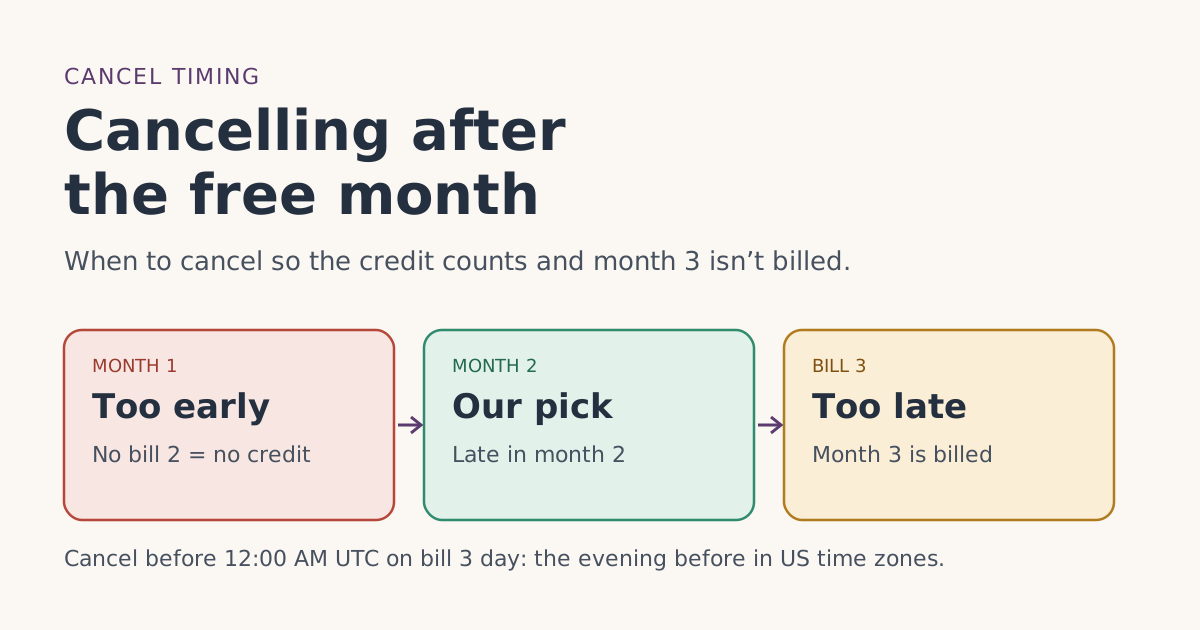
to avoid next month's charge you must cancel before that invoice is generated. Starlink also ties billing to UTC, and changes must be made before 12:00 AM UTC on your billing day. In US time zones that is the evening before: 8 p.m. Eastern or 5 p.m. Pacific during daylight saving time, and 7 p.m. Eastern or 4 p.m. Pacific in winter. Cancelling on the morning of your billing day is too late for that bill. Our guide to cancelling after the free month works through the timing with dates.
Common mistakes
- Counting the return window from delivery. It starts at the Payment Due Date. That usually gives you a few extra days, not fewer, but only if you know the real date.
- Treating a full bill 1 as a failed referral. It is expected. Look at the bill 2 preview instead.
- Leaving the kit in the box to “save” days. It doesn’t. Day 7 after delivery starts billing anyway.
- Pausing to Standby before bill 3. Standby doesn’t count toward the two full cycles. See paused or cancelled early.
- Cancelling on billing day. The cutoff is midnight UTC, which is the evening before for US customers.
What we don’t know
Starlink does not publish how the credit appears when the first cycle is shortened by the 28th rule, whether it covers anything beyond one month of service, or the exact day the confirmation email is sent. When something isn’t written down, we say so instead of guessing. Your bill preview is the source of truth for your account.
What to do next
- Write down your delivery date and your planned setup day. The earlier one plus the 7-day rule gives your Payment Due Date.
- Add three reminders: the day before bill 2 (check the preview), the day before the return window closes, and the day before bill 3.
- If bill 2’s preview doesn’t show the credit, start with the free month not showing up troubleshooter.
- Not ordered yet? Follow the step-by-step order guide so the referral sticks in the first place.
Questions people ask
What is the Payment Due Date on Starlink?
Does Starlink start billing if I haven’t set up the dish?
Is the free month on my first bill?
Can I change my Starlink billing date?
When does the 30-day return window start?
What time of day does a Starlink bill run?
Sources
- Starlink Terms of Service, US (sections 3, 6.2 and 6.3) Starlink
- How do I use a referral link? (Starlink help center) Starlink
- What are the Residential plans? (Starlink help center) Starlink
- How does the monthly service billing cycle work? (Starlink help center) Starlink
- Additional FAQs - Billing (Starlink help center) Starlink
- Additional FAQs - Account (Starlink help center) Starlink
- What is the rent Starlink option? (Starlink help center) Starlink
- Why did I receive a "Payment Scheduled" email? (Starlink help center) Starlink
- How do I cancel service? (Starlink help center) Starlink
Related guides
 When the credit landsHow to check the free month in your Starlink bill previewWhere to find Starlink’s bill preview on the web and in the app, what the free-month credit looks like on bill 2, and what to do if it isn’t there yet.
 When the credit landsCancelling after the free month: timing that keeps the credit and avoids an extra billWhen to cancel Starlink after the referral free month so two full billing cycles count and bill 3 isn’t charged, with dated examples and the UTC cutoff.
 Trial and returnsThe free month and the 30-day return window on one calendarThe Starlink return window closes right around the day the free month lands on bill 2. Dated examples, what each one is worth, and how to decide by day 25.