Key takeaways
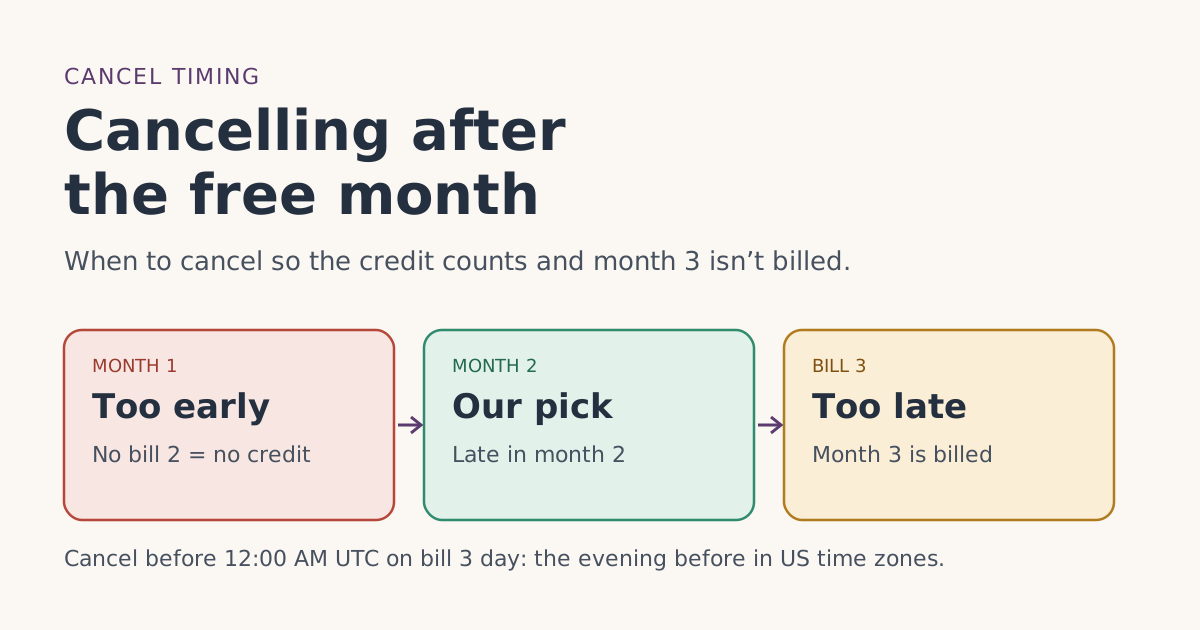
- You can cancel any time, but to avoid next month's charge you must cancel before that invoice is generated, and the cutoff is 12:00 AM UTC on your billing day: the evening before in US time zones.
- Cancelling in month 1 means there is no bill 2, so there is nothing for the free month to be credited against.
- The referral terms require two full monthly billing cycles on a high-speed plan, continuously, with Standby Mode not counting. Our reading: cancel late in month 2, after the credit has posted.
- If you already know you won’t keep Starlink, the 30-day return refunds the kit and month 1. That is worth more than the free month.
- Rented kits must go back within 30 days of cancelling, or Starlink charges the full kit price.
If you want to cancel after the free month, the window is month 2: after bill 2 has posted with the credit, and before 12:00 AM UTC on the day bill 3 would be generated. Cancel earlier and there is no bill 2 for the credit to land on; cancel later and month 3 is already billed.
That’s the mechanical answer. The rest of this guide covers the rule behind it, a dated example, what changes if you rented the kit, and the honest question underneath: if you already know you’ll leave, the free month may not be the right thing to chase.
The rules that set the window
Four pieces of Starlink’s own text decide when cancelling is safe.
- Cancelling stops future bills, not the current one. Starlink’s cancel article says your service “will remain active up until the date paid for, and will be removed from future billing cycles.” Its Terms of Service add that to avoid next month's charge you must cancel before that invoice is generated.
- The cutoff is in UTC. “Starlink subscriptions billing is tied to UTC time; changes must be made before 12:00 AM UTC on your billing day.”
- The free month needs two full cycles. The referral terms define the minimum as two full monthly billing cycles on a high-speed plan, continuously, with Standby Mode not counting, and Starlink’s help article tells new customers to activate your kit and stay subscribed for at least 2 months.
- Starlink watches for quick exits. The terms say the new customer must be “an active user of the Starlink service with genuine intent to remain subscribed,” and that Starlink “will review Referred Subscriber retention patterns for deviations from the applicable country Starlink subscriber average.”
Put together: the credit is applied to bill 2, and the two full billing cycles end the day before bill 3. Cancelling late in month 2 lets both of those happen without paying for month 3.
A dated example
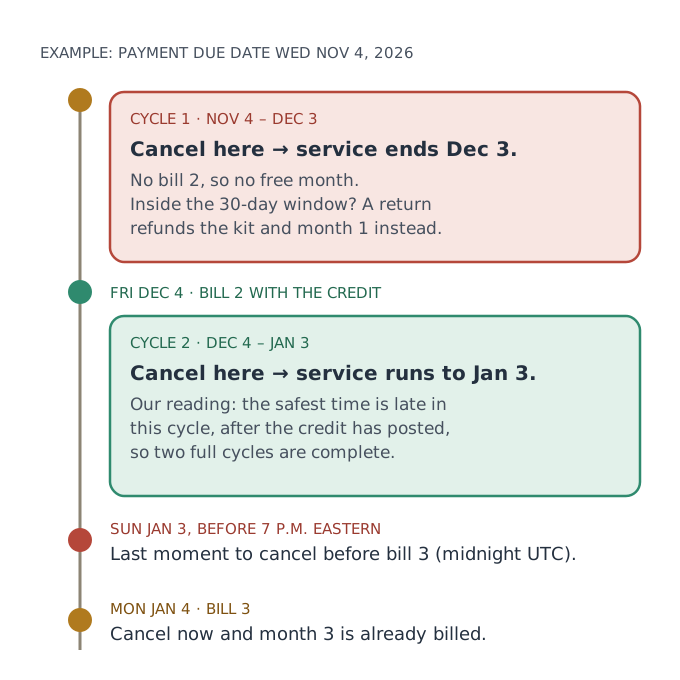
Your Payment Due Date is Wednesday, Nov 4, 2026. You chose Residential 100 Mbps at $55/mo.
| Date | What happens | If you cancel on this date |
|---|---|---|
| Wed Nov 4 | Bill 1, paid in full | Service runs to Dec 3. No bill 2, no credit. Return window still open. |
| Thu Nov 26 | Still in cycle 1 | Same as above. A return is the better move if you’re leaving. |
| Fri Dec 4 | Bill 2, free month credited | Service runs to Jan 3. The credit is already on bill 2. |
| Mon Dec 28 | Late in cycle 2 | Service runs to Jan 3. Our pick for when to cancel. |
| Sun Jan 3, before 7 p.m. Eastern | Last moment before the cutoff | Bill 3 is not generated. |
| Mon Jan 4 | Bill 3 | Too late for this bill. You pay month 3 and keep service to Feb 3. |
In money terms, cancelling on Dec 28 means you paid for one month of service and got two. Cancelling on Jan 4 means you paid for two and got three, which is fine if you wanted the third month, but not if you meant to leave.
Why “late in month 2” and not “the day after bill 2”
Both keep service until Jan 3, so both technically complete the second cycle. We suggest late in month 2 for two reasons, and we want to be clear this is our reading, not a Starlink rule:
- The credit needs to have posted. Starlink’s credits article says a credit added after a bill is generated goes on the following bill. If your credit was late, cancelling right away could leave it with no bill to land on. Check that bill 2 actually shows the credit first. See how to check the bill preview.
- Retention review. Starlink doesn’t publish how it judges “genuine intent,” only that it compares retention to the country average. A cancellation filed the morning the credit lands is the pattern that rule seems written for.
Starlink doesn’t say whether filing a cancellation during cycle 2 affects the credit. If keeping it matters to you, the cautious path is to stay through cycle 2 and cancel in its last few days.
The time-zone cutoff, in plain numbers
Midnight UTC is the start of your billing day in UTC, which is the evening before in the US.
| Your time zone | During daylight saving time | In winter (standard time) |
|---|---|---|
| Eastern | 8 p.m. the evening before | 7 p.m. the evening before |
| Central | 7 p.m. | 6 p.m. |
| Mountain | 6 p.m. | 5 p.m. |
| Pacific | 5 p.m. | 4 p.m. |
| Alaska | 4 p.m. | 3 p.m. |
| Hawaii (no DST) | 2 p.m. | 2 p.m. |
Give yourself a full day of margin. Cancelling “on the day” is already too late.
How to cancel
From Starlink’s cancel article, on the website:
- Sign in to your Starlink account at starlink.com.
- On the Home page, select Your Subscription, then Manage next to your service plan.
- Click Cancel Service.
Afterward, look for an end date on the service line. Starlink’s billing FAQ says a cancelled line shows an end date; a future date means service ends that day. If you change your mind before then, Starlink says you can click Resume in the “Your service plan will end on…” alert.
a rented kit must go back in good condition within 30 days of cancelling, or you're charged the kit's full price. Starlink’s return article says a return label is issued when you cancel. Put the 30-day deadline in your calendar the day you cancel.
If you already know you’re leaving
Be honest with yourself here. The referral terms are built for people who mean to stay, and two features matter more than the free month if you don’t:
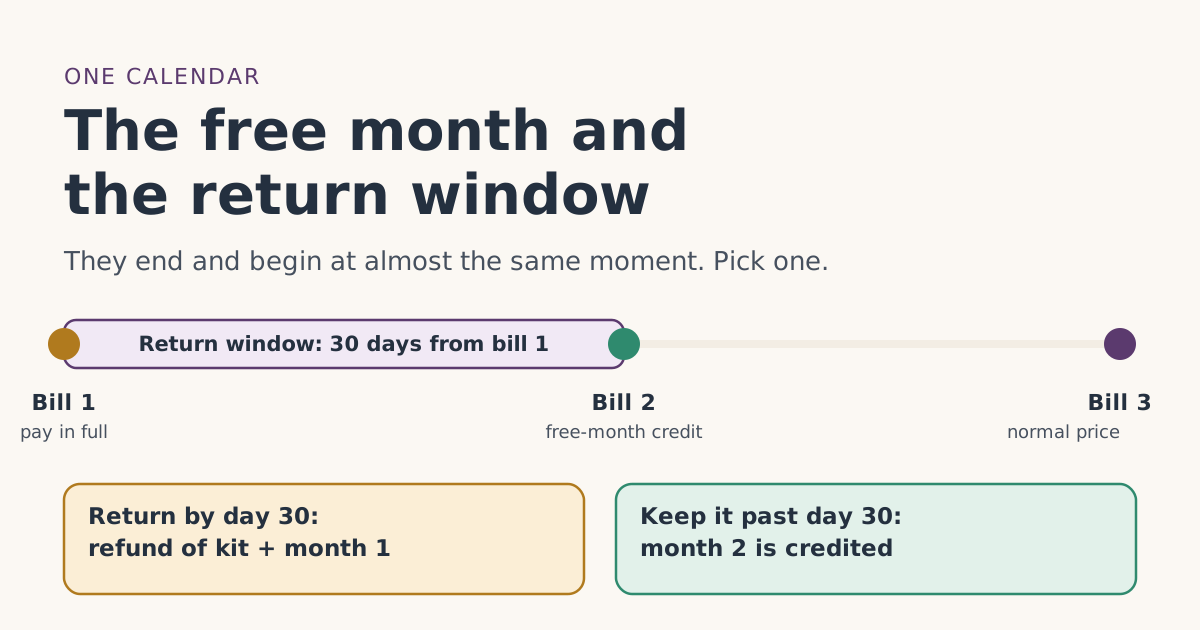
- The return window is worth more. return an undamaged kit bought on starlink.com within 30 days of the Payment Due Date for a full refund, including the first month's fee. That refund covers the kit and month 1. The free month covers one month of service and you keep paying for the kit either way. If you’re within 30 days of your first bill and unhappy, a return beats waiting for bill 2. Our guide to the free month and the return window on one calendar shows the dates side by side.
- A short need is a poor fit for either. If you only need internet for a few weeks, neither the return window nor the free month was designed for that. Starlink’s terms explicitly look for sign-ups that leave early.
If you’re a seasonal user who will pause rather than leave, read part-year use and “genuine intent” first. Standby Mode doesn’t count toward the two cycles, so pausing too early has the same problem as cancelling too early. See also paused or cancelled early.
Cancelling after day 30 but before bill 2
This is the in-between case: the return window has closed, bill 2 hasn’t come yet, and you want out.
- No refund. Starlink’s help center says kits returned outside the 30-day window get no refund.
- No free month. Service ends at the end of cycle 1, so bill 2 is never generated.
- What you keep. The kit, if you bought it. Starlink’s reactivation article says you can reactivate later, subject to capacity, though you would no longer be a new customer for referral purposes.
If you’re this close to bill 2 and only mildly unhappy, staying one more month costs you nothing for service (the credit covers it) and gives you a second month to decide.
Cancel or pause: which fits after the free month
Cancelling isn’t the only way to stop paying full price after cycle 2. Starlink also offers Standby Mode: Standby Mode pauses high-speed service for a small monthly fee; it isn't offered on promotional offers or select kit rentals. Starlink’s pausing article says Standby gives unlimited low-speed data, up to 500 Kbps, keeps full access to the app and your account, and lets you resume a full-speed plan later. It also says pausing before the end of a billing period lets you keep service for the rest of that period, and resuming is charged right away on a prorated basis.
| Cancel | Pause with Standby | |
|---|---|---|
| Monthly charge after it takes effect | None | A small monthly fee (shown in your account) |
| Internet while stopped | None | Low-speed only |
| Coming back | Reactivate, subject to capacity | Resume a full-speed plan |
| Rented kit | Return within 30 days | Starlink says rentals can’t pause |
| Counts toward the two cycles | No | No |
Standby is meant for people who will come back, such as seasonal homes. It is not a way around the two-cycle rule: start it only after cycle 2 has finished. Whether Standby is offered on your plan is shown in your account; Starlink says it isn’t available on promotional offers or some rentals. Our plans guide covers which plans carry the free month in the first place.
Common mistakes
- Cancelling on bill 3 day. The UTC cutoff has already passed.
- Cancelling in month 1 expecting the free month later. There is no bill 2 to credit.
- Switching to Standby instead of cancelling, before cycle 2 ends. Standby doesn’t count as a full-speed cycle.
- Forgetting the rental return. 30 days after cancelling, or the full kit price.
- Expecting unused credit back. Starlink says credits aren’t reimbursed if you discontinue service.
What we don’t know
Starlink doesn’t publish whether cancelling during cycle 2 (with service still running to its end) can affect the referral credit, how it measures “retention patterns,” or what happens to a credit that was applied late. We’ve given our reading and labeled it. The billing timeline tool works out your own cycle dates.
What to do next
- Find your Payment Due Date and write down bill 2 and bill 3 dates.
- After bill 2, confirm the credit is on it.
- If you’re leaving, set a reminder two or three days before bill 3, and cancel then.
- Rented kit: book the return the same day.
Questions people ask
Can I cancel Starlink right after the free month?
Will I lose the free month if I cancel?
What counts as two full billing cycles?
What time should I cancel to avoid the next bill?
Do I get money back for the free month if I cancel?
Do I have to return the kit when I cancel?
Sources
- Starlink Terms of Service, US (sections 3, 6.2 and 6.3) Starlink
- Referral Program Terms, US (starlink.com legal document DOC-1882-84808-83) Starlink
- How do I use a referral link? (Starlink help center) Starlink
- What are the Residential plans? (Starlink help center) Starlink
- How do I return my Starlink kit? (Starlink help center) Starlink
- How does pausing service work? (Starlink help center) Starlink
- How do I cancel service? (Starlink help center) Starlink
- Do I need to sign a contract to use Starlink? (Starlink help center) Starlink
- Billing - Credits (Starlink help center) Starlink
- Additional FAQs - Billing (Starlink help center) Starlink
Related guides
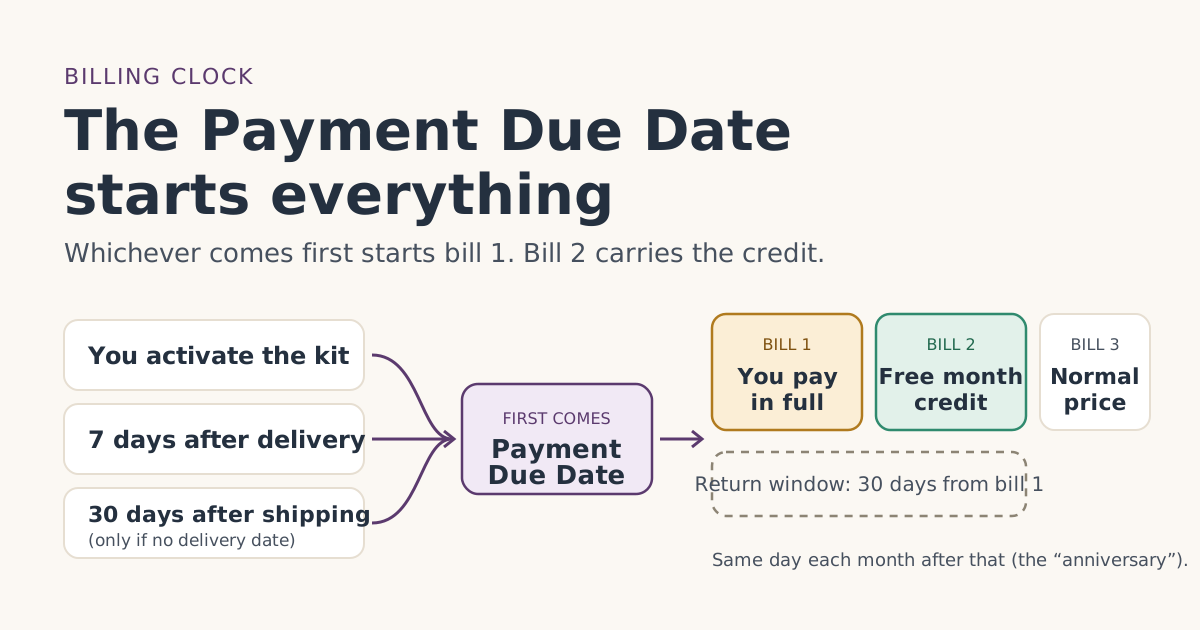 When the credit landsThe Payment Due Date: the one date that sets your free-month timelineYour Starlink Payment Due Date decides when bill 1 hits, when the return window closes and which bill carries the free month. How to find yours.
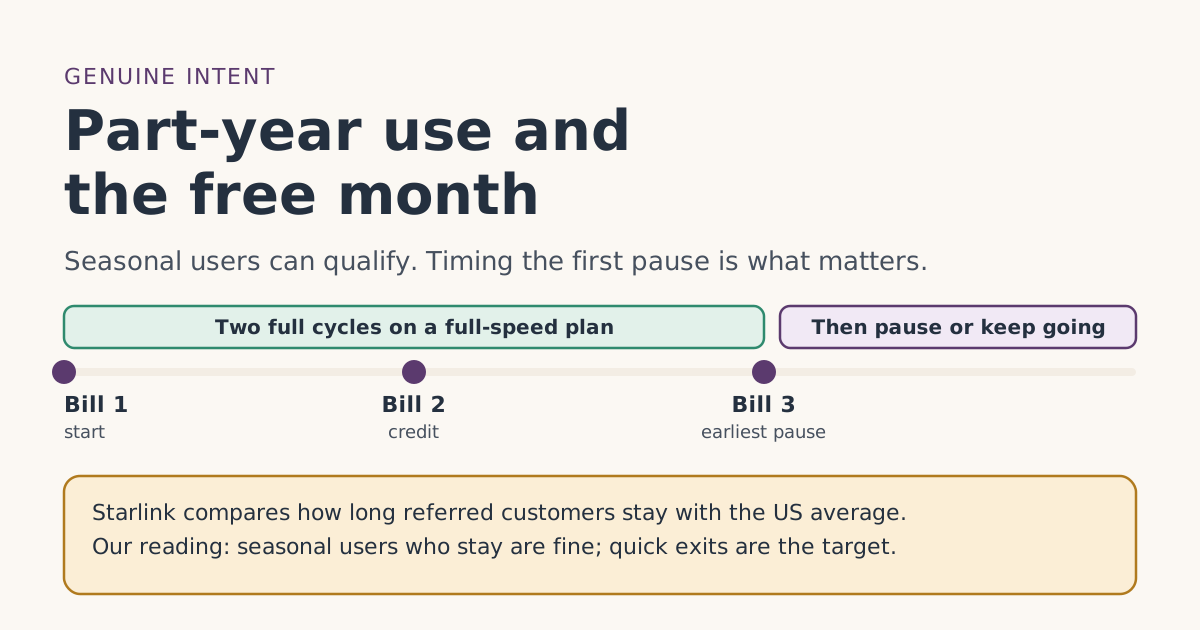 Who qualifiesOnly need Starlink part of the year? The free month and “genuine intent to stay”Can seasonal or part-year Starlink users get the referral free month? What “genuine intent to stay” means, when it’s safe to pause, and when to skip it.
 Trial and returnsThe free month and the 30-day return window on one calendarThe Starlink return window closes right around the day the free month lands on bill 2. Dated examples, what each one is worth, and how to decide by day 25.