Key takeaways
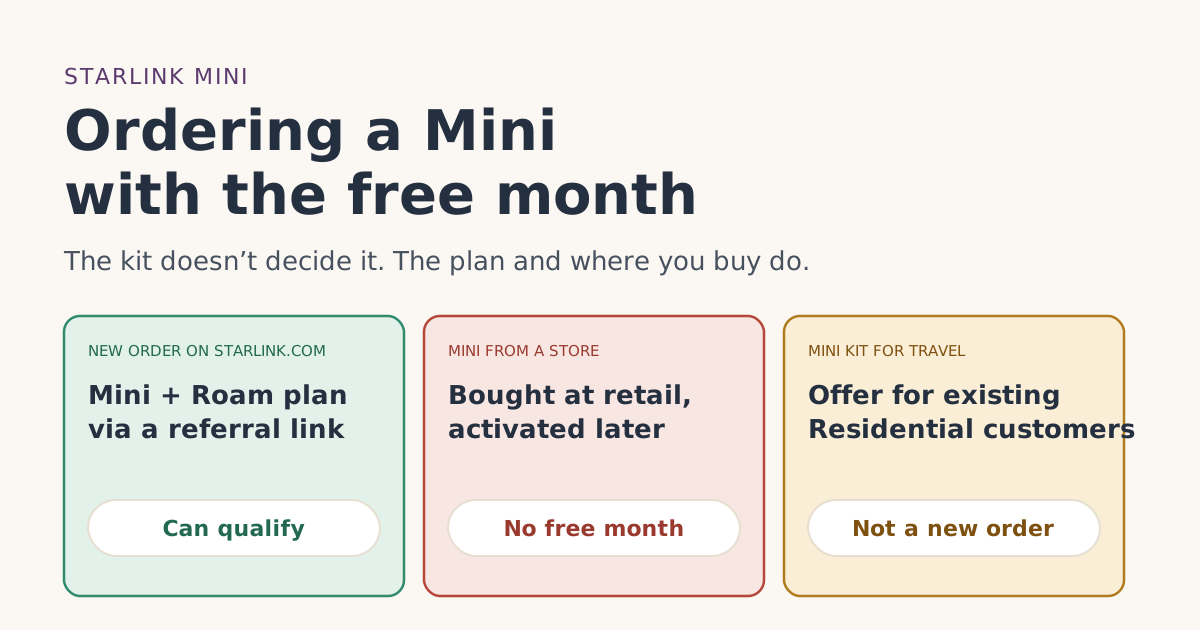
- The free month depends on the order and plan, not the kit. Roam 100GB, Roam 300GB and Roam Unlimited are all on Starlink’s list.
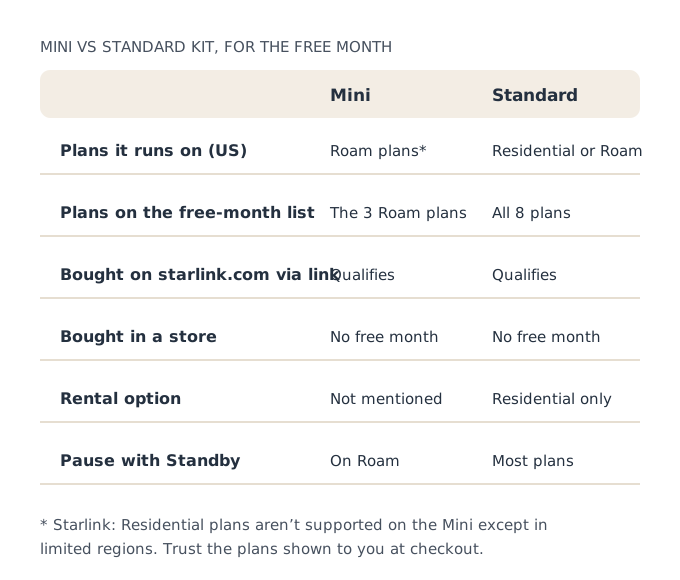
- Starlink says the Mini runs on Roam (and Priority) plans in most countries, and Residential plans aren’t supported on the Mini except in limited regions.
- Starlink’s Mini page still names Roam 50GB, while US Roam is now 100GB, 300GB and Unlimited. Trust the plans shown at checkout: eligible plans are shown to you at sign-up.
- A Mini from a store doesn’t qualify: kits from resellers, retailers or an account transfer are not eligible.
- The Optional Mini Kit for Travel is for customers who already have Residential, so it isn’t a free-month route.
Yes, a Starlink Mini can come with the free month, as long as you order the Mini and a plan from Starlink’s list together on starlink.com through a referral link, as a new customer with a US service address. In the US, the Mini runs on Roam plans, and Roam 100GB, Roam 300GB and Roam Unlimited are all on the free-month list. What rules it out is the same as for any kit: buying it in a store, having had Starlink before, or ordering without the link.
There are two Mini-specific wrinkles worth knowing: Starlink’s own pages don’t agree perfectly on Roam plan names for the Mini, and there’s a separate “Mini Kit for Travel” offer that sounds similar but is only for existing customers. Both are covered below.
The rule: plan and order, not hardware
Nothing in the referral terms mentions which kit you buy. The conditions are about you and your order:
- you are not, and have never been, a Starlink subscriber.
- the order must be placed with a customer's unique referral link; no other referral method counts.
- The kit and subscription are bought kit and subscription bought directly on starlink.com; stores, unauthorized resellers and private transfers don't qualify.
- your service address must be in the same country as the referrer's.
- You stay for two full monthly billing cycles on a high-speed plan, continuously, with Standby Mode not counting.
And the plan: Starlink’s referral help article says credits issue only on Residential Lite, Residential, Residential 100 Mbps, Residential 200 Mbps, Residential Max, Roam 100GB, Roam 300GB and Roam Unlimited. For a Mini, the relevant ones are the Roam plans.
Which plans a Mini runs on
Starlink’s Mini availability article lists the United States among countries where the Mini is sold “on starlink.com or through select … retailers,” and says:
Starlink Mini is compatible only with Roam 50GB, Roam Unlimited, Local Priority, and Global Priority plans in most countries. Residential plans are not supported on Starlink Mini except in limited regions.
That article names Roam 50GB, but Starlink’s US Roam lineup in our fact file is Roam 100GB, Roam 300GB and Roam Unlimited, and Starlink has a help article titled “Roam 50GB is now Roam 100GB.” Starlink’s Mini Kit for Travel article, written for US and Canadian customers among others, also mentions starting the Mini on “Roam 100GB, Roam 300GB (United States and Canada), or Roam Unlimited.”
Our reading: in the US, a Mini can go on Roam 100GB, Roam 300GB or Roam Unlimited, all of which carry the free month. But don’t rely on our reading or on an older help article. The referral terms say eligible plans are shown to you at sign-up, and the order page shows which plans a Mini can take at your address. Pick from those.
What one free month is worth on a Mini
The free month is one free month of service on the eligible plan you pick, so on a Mini it’s worth one month of your Roam plan:
| Roam plan | Monthly price | The free month is worth |
|---|---|---|
| Roam 100GB | $55/mo | $55/mo |
| Roam 300GB | $80/mo | $80/mo |
| Roam Unlimited | $175/mo | $175/mo |
We don’t have a dated price for the Mini kit itself in our fact file, so we haven’t listed one. Starlink’s availability article notes that “pricing may be higher in high-usage areas like the US due to network demand.” Check the kit price at checkout.
Ways to get a Mini, and which ones carry the free month
A new order on starlink.com, through a link
This is the only route that carries the free month for a new customer. Open the referral link on the device you’ll pay on, choose the Mini and a Roam plan, enter your US service address, and pay, all in that one browser. Our step-by-step order guide has the details.
A Mini from a store
Starlink sells the Mini through some retailers too. A store Mini works once activated, but it doesn’t qualify: kits from resellers, retailers or an account transfer are not eligible. Returns of store kits go back to the store: kits bought from a store or reseller go back to that store, under its own policy. See store or phone order.
The Optional Mini Kit for Travel
This is easy to confuse with a free-month offer. Starlink’s article says it is “available only to customers in select countries with an active Residential plan.” Eligible customers get a Mini “with no monthly hardware rental cost and a special lower rate on eligible Roam plans,” claimed from a “Claim Mini” email. Conditions include:
- The Mini must stay on a Roam plan or Standby, and you must keep your Residential plan.
- If you cancel Residential, switch home service to another plan type, or cancel the Mini’s service, you must return the Mini within 30 days or be charged its retail price.
- It “may not be transferred” and is “limited to one per customer.”
Because it’s for people who already have Residential, it isn’t a new-customer order and doesn’t come with the referral free month. If you already have Starlink, our guide to second kits and second homes covers your options.
Mini or standard kit?
For the free month itself, it doesn’t matter: both qualify on listed plans. The choice is about use. Our reading of Starlink’s pages:
- The Mini is built around Roam: travel, camping, vehicles, and use away from a fixed address. In the US it runs on Roam plans.
- The standard kit can run on Residential plans at a fixed home, with unlimited data on every Residential tier, or on Roam.
If Starlink will mostly stay at one home with heavy use, a standard kit on Residential may suit you better. If you’ll travel, the Mini on Roam fits. Our Residential or Roam guide goes deeper, and our plans page shows what one free month is worth on every listed plan.
A worked example
You want a Mini for weekend trips and some use at home. On Friday, Nov 13, 2026, you open a friend’s referral link on your laptop, add a Mini, and the order page offers Roam 100GB, Roam 300GB and Roam Unlimited at your US address. You pick Roam 300GB at $80/mo and pay in that same tab.
- Bill 1 (the day you activate, or 7 days after delivery): Roam 300GB at full price.
- Bill 2, one month later: a one-month service credit; the free month is worth $80/mo.
- Standby between trips: only after bill 3, since the terms exclude Standby from the two full cycles.
Returning a Mini inside 30 days
A Mini bought on starlink.com is covered by the same return policy as any kit: return an undamaged kit bought on starlink.com within 30 days of the Payment Due Date for a full refund, including the first month's fee. Shipping isn’t refunded. Starlink’s return article covers “unopened or used” kits; you cancel the subscription, tick “I would like to return my hardware,” and use the prepaid label Starlink emails.
That makes the first month a good time to answer the questions a Mini buyer usually has:
- Does it suit your trips? Use it where you actually travel: campsites, the car, a boat on inland water. Roam includes “in-motion use” and countrywide coverage, according to Starlink.
- Is the data allowance right? On Roam 100GB or 300GB, Starlink says service drops to low-speed data after the allowance. Track your use over the first few weeks.
- Will you use it at home much? If the Mini ends up at home most of the time, a standard kit on Residential may be the better long-term fit.
Decide by about day 25 so there’s time to start a return. If you keep it, the free month lands on bill 2. Our guide to the free month and the return window puts both on one calendar.
Common mistakes
- Buying the Mini in a store and expecting the free month.
- Assuming the Mini Kit for Travel is a free-month offer. It’s for existing Residential customers.
- Picking a plan name from an old article instead of what checkout shows.
- Starting Standby after the first trip. Wait until after bill 3.
- Choosing Roam 100GB for heavy home streaming. You’ll hit the allowance; a bigger Roam plan or a standard kit on Residential may fit better.
- Ordering the Mini on your phone after opening the link on a laptop. Finish in one browser.
What we don’t know
Starlink’s Mini article still names Roam 50GB, and we don’t have a dated Mini kit price. We’ve told you what each Starlink page says and labeled our reading. If checkout shows something different, checkout is right.
What to do next
- Check you qualify with the eligibility checker.
- Open the referral link on the device you’ll order on.
- Add the Mini, pick a Roam plan shown at checkout, and finish in one browser.
Questions people ask
Does the Starlink Mini get the free month?
What plans work with the Starlink Mini?
Can I get the free month on a Mini bought at a store?
What is the Starlink Mini Kit for Travel?
Is the free month worth the same on a Mini?
Can I pause a Mini?
Sources
- Referral Program Terms, US (starlink.com legal document DOC-1882-84808-83) Starlink
- How do I use a referral link? (Starlink help center) Starlink
- What are the Roam service plans? (Starlink help center) Starlink
- How do I return my Starlink kit? (Starlink help center) Starlink
- Starlink Terms of Service, US (sections 3, 6.2 and 6.3) Starlink
- Where is Starlink Mini available? (Starlink help center) Starlink
- Optional Mini Kit for Travel (Starlink help center) Starlink
- Traveling with Starlink Roam (Starlink help center) Starlink
- What is the rent Starlink option? (Starlink help center) Starlink
Related guides
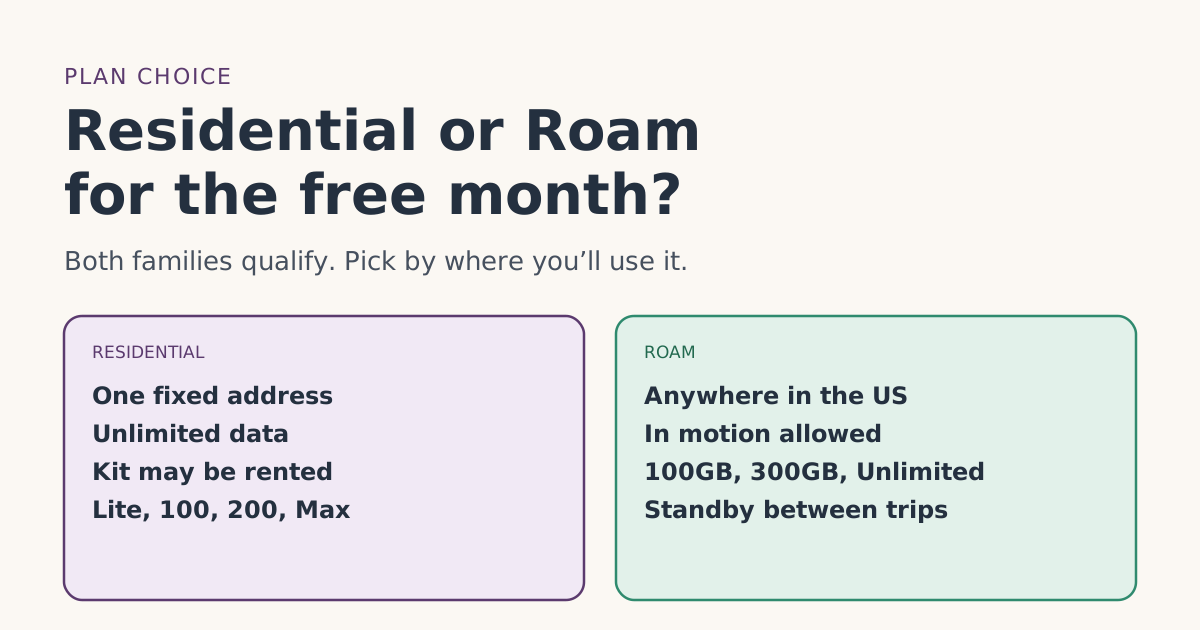 PlansResidential or Roam for the free month: how to chooseStarlink Residential and Roam plans both carry the referral free month. How they differ, what the month is worth on each, and which fits home or travel.
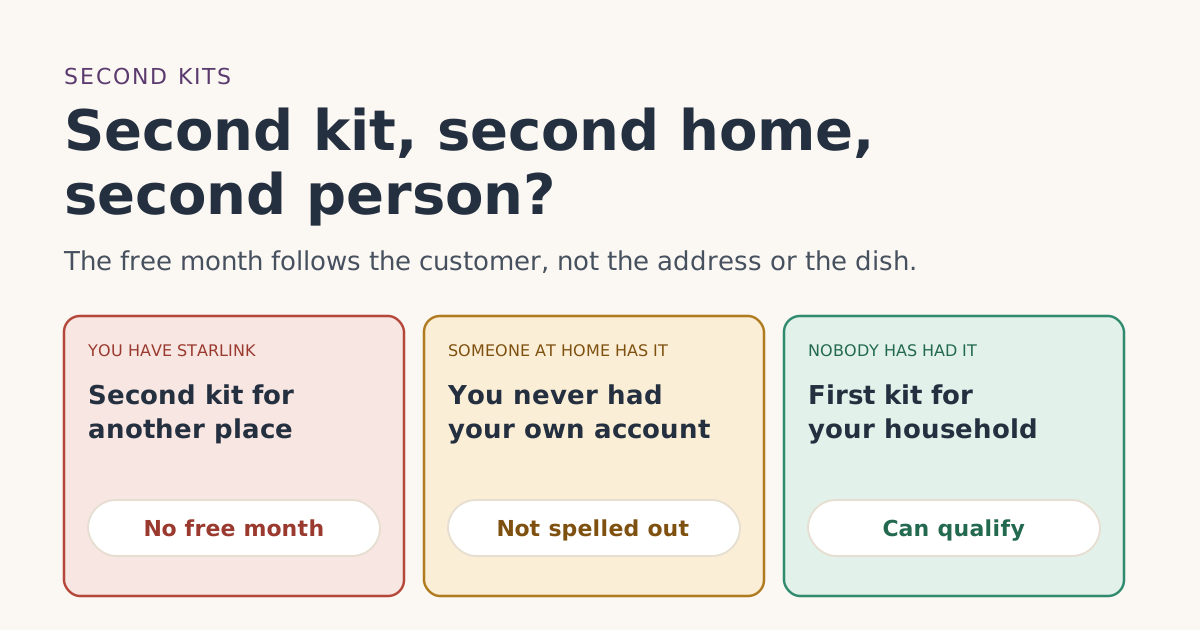 Who qualifiesAlready have Starlink? Second kits, second homes and a second person in the householdExisting Starlink customers don’t get the free month on a second kit or vacation home. What about a spouse or adult child? What the terms say and leave open.
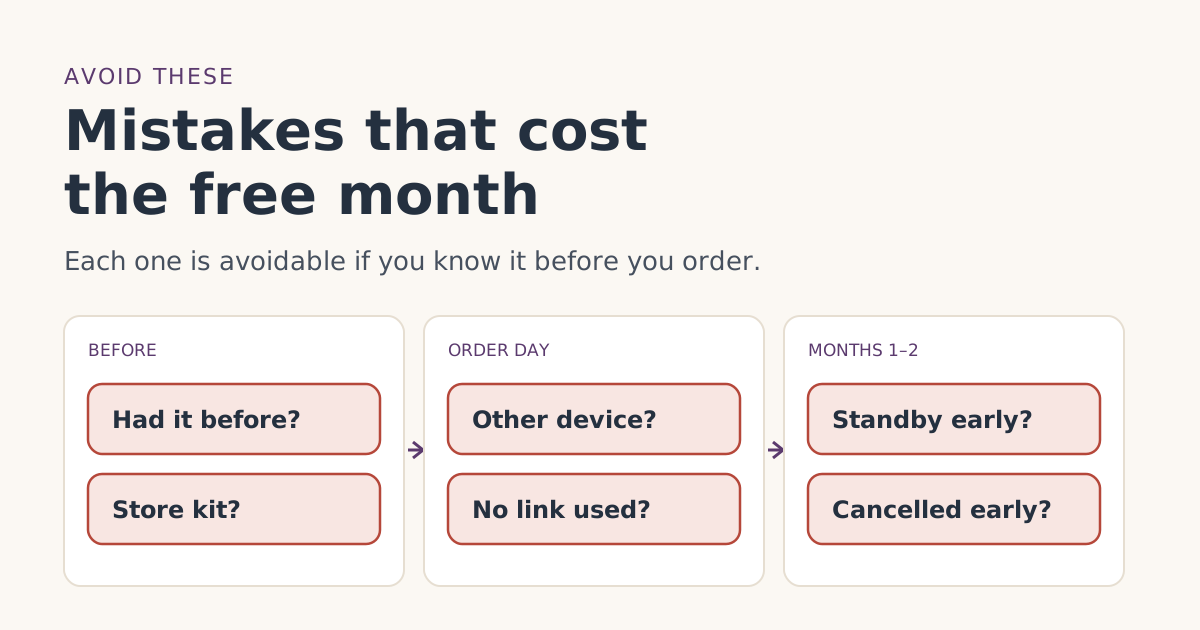 Ordering rightOrdering mistakes that cost people the Starlink free monthThe ordering mistakes that cost people the Starlink referral free month, from store kits and switching devices to pausing early, and how to avoid each one.